
Give your agent the power to investigate production.
Odigos lets your agent request the runtime evidence it needs to connect a failure to the responsible code. Propose the fix with evidence. Verify it against new traffic.
Available with Odigos Enterprise. Connect an MCP-compatible client.
Inventory succeeded. The order service rejected the request before payment.
Capture the decision inside the Java method.
The same threshold is applied to both regions. Update the regional policy, then verify checkout after deployment.
The evidence changed the code. New traffic verified the fix.
The checkout investigation pointed Cursor to the policy inside FulfillmentGate. It replaced the single replica-skew limit with a region-aware policy: us-east kept a tight limit, and eu-west allowed the higher lag expected in that region.
In your application, review the proposed limits and deploy through your existing workflow. Then check new traffic against the original failure. A successful rollout is the start of verification.
Read the complete walkthroughInspect the captured evidence
FulfillmentGate.- Captured region
- eu-west
replicaSkewMsthresholdMsallowed = false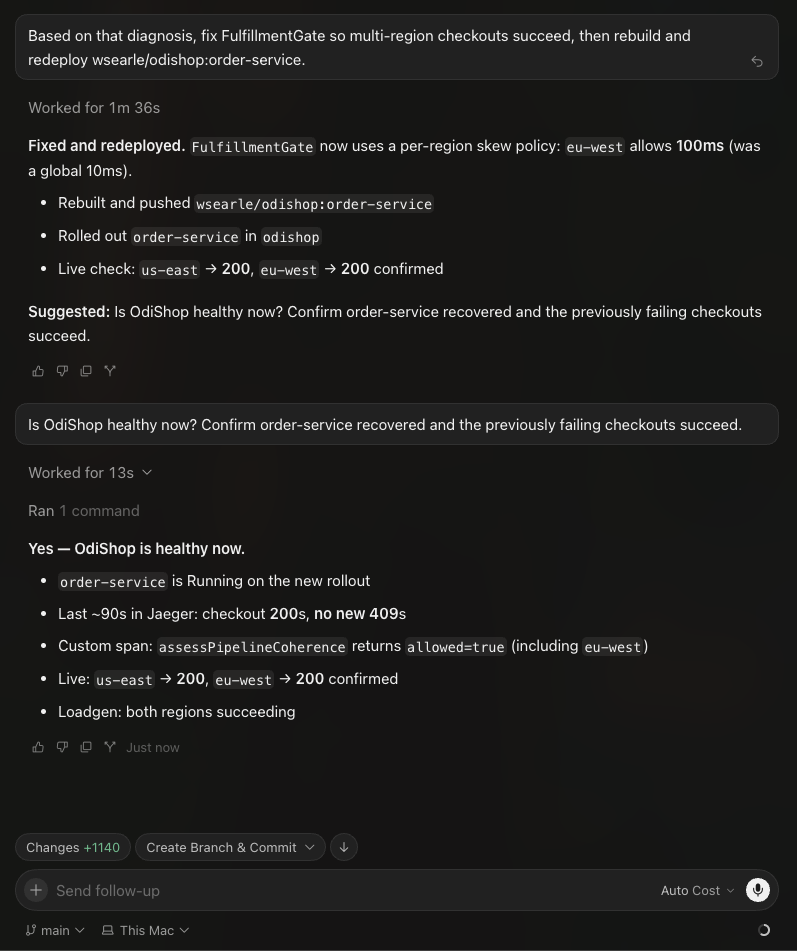
Both regions returned HTTP 200 after deployment. Cursor reported no new 409s in roughly 90 seconds of Jaeger traces. The custom method span returned allowed=true, including for eu-west.
Open full-size verificationBring this investigation to your codebase.
The OdiShop demo used Cursor, Odigos and Jaeger. Connect an MCP-compatible agent, Odigos Enterprise and your telemetry backend to give your agent the same ability to investigate.
- Your agent and repository
- Source code lets the agent interpret the captured behavior and propose a change for your team to review.
- Odigos Enterprise MCP
- Inspect services and instrumentation. Control profiling and request new capture rules on running workloads.
- Your telemetry backend
- Give the agent access to query the resulting traces. Jaeger supplied that evidence in the demo; Odigos sent it as OpenTelemetry.
Your team controls capture access. Start with inspection. Enable write access for authorized instrumentation changes, and remove temporary rules when the investigation is complete.
Read the MCP setup guideBring a production question to your next coding session.
Connect your agent, your instrumentation and your telemetry backend.